How to Listen to Any Article on the Web
• By Elliott Tong
To listen to any article online, install the Alexandria Chrome extension. When you visit an article — Substack, Medium, news sites, blogs, anywhere — a play button appears on the page. Click it to hear the article read aloud with word-by-word highlighting in sync with the audio. Save articles to your library to finish later, and pick up exactly where you left off on any device.
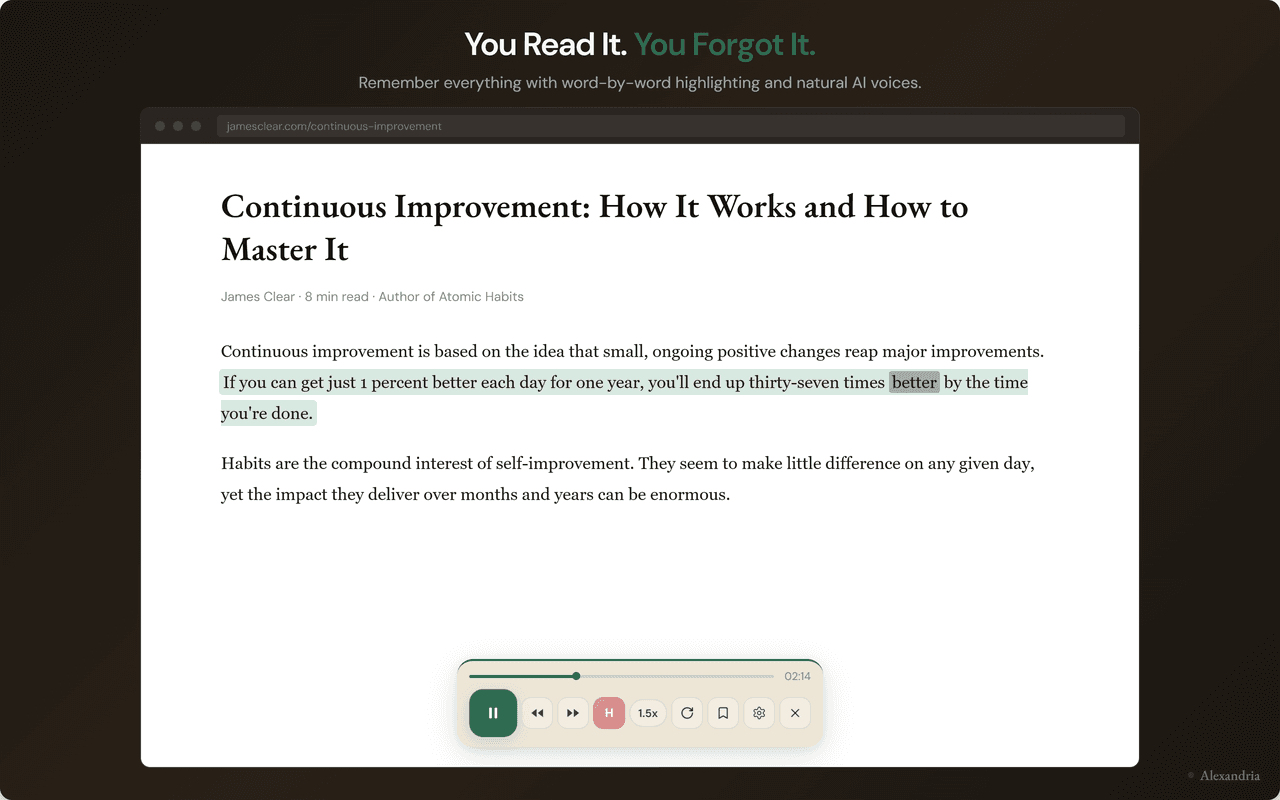
What you see when you click play on any article
- Play buttonAppears automatically on article pages. One click to start listening.
- Word-by-word highlightThe current word stays highlighted in sync with the audio. Glance away and look back without losing your place.
- Speed control0.5x to 5x on the free tier. Most people settle into 1.5x-2.5x within a couple of weeks.
Read Less, Listen More — Without Losing the Reading Experience
The average professional saves dozens of articles a week — Substacks, blog posts, long reads, research papers — and reads almost none of them. They sit in Pocket, in browser bookmarks, in the back of your mind as 'I'll get to it.' By the time you remember they exist, the moment for the idea has passed.
Alexandria fixes this with two moves: hit play on any article and listen at your own speed; save it to a library that syncs across devices so you can resume anywhere.
Key Facts
- The average reader retains roughly 10% of what they read passively versus around 30% when reading and listening simultaneously [Paivio dual coding research, University of Western Ontario].
- At 1.5x speed a 10-minute article takes about 6.5 minutes. At 2x it takes 5 minutes. At 3x it takes 3.5 minutes.
- 71% of desk workers say eye strain is hurting their productivity [Allwork.Space, 2026].
- 55% of US adults aged 18+ have listened to an audiobook at least once, and habitual listeners report finishing more books than habitual readers [Edison Research, 2024].
- Alexandria works on any web page, including Substack, Medium, news sites, personal blogs, and academic journals.
Listen at speeds that actually save you time
Reading speed for a typical adult is 200-250 words per minute. Audio at 1x is around 150 wpm. Speed up to 1.5x and you match reading pace. Speed up to 2x or 3x and you exceed it — without the eye strain. Most listeners settle into 1.5x-2.5x within a couple of weeks of regular use.
Word-by-word highlighting keeps your eyes anchored
Pure audio loses your place the moment your attention wanders. Alexandria highlights each word as it's spoken so you always know where you are. Look up at the screen mid-paragraph and the highlighted word tells you exactly where the audio is. This is the dual coding effect — pairing auditory and visual processing creates stronger memory encoding than either channel alone [Paivio, 1971].
Save to library, finish later, anywhere
Click 'Save' on any article and it goes to your Alexandria library. Open the library on a different device — phone in the morning, laptop at lunch, tablet at night — and pick up exactly where you left off. The article downloads cleanly without ads or layout junk, and your reading position syncs.
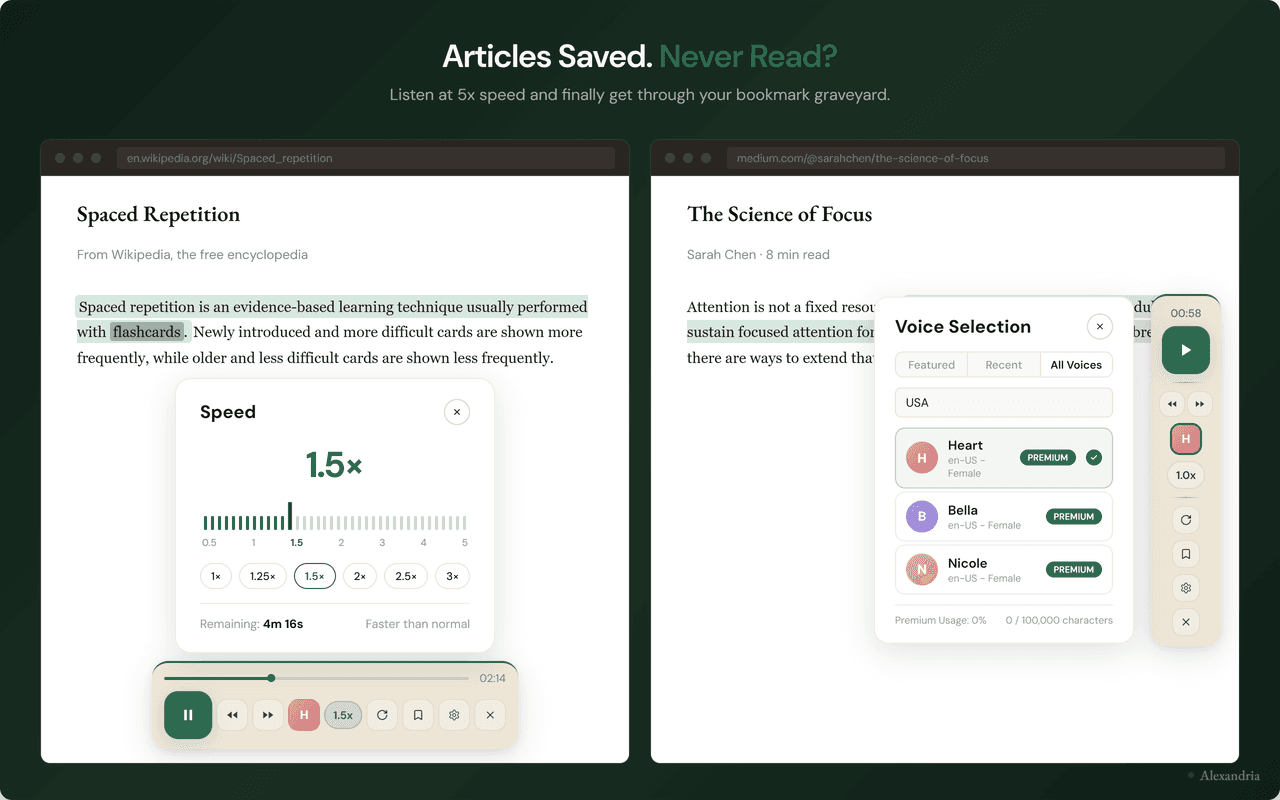
Save to your library, finish anywhere
- Save with one clickClick 'Save' on the widget and the article goes to your library — without ads, sidebars, or layout junk.
- Cross-device syncOpen the library on phone, laptop, or tablet. Reading position syncs in near real-time.
- Resume where you left offThe audio picks up exactly where you stopped — even if that was on a different device this morning.
When Listening to Articles Works Best
Long reads and Substack essays
The 5,000-word essay you saved on Sunday and never read by Friday. Listening at 1.5x makes a 25-minute read into 17 minutes. Newsletters, longform journalism, opinion pieces — articles where you want to absorb the argument rather than scan.
Research papers and reports
Dense PDFs and academic articles are easier to follow when listened to at 1x with highlighting. The audio paces you so you can't skip ahead skimming. Save them to library for the second pass.
Catching up on backlog
If you have 50 saved articles you've meant to read for months, listening at 2.5x-3x lets you process the queue. Some you'll keep, some you'll archive. Either way, they stop being mental debt.
Article reading when your eyes are tired
Late afternoon, after hours of screen time, reading is harder than listening. Switch to audio for the rest of the day. For a wider look at TTS options for Chrome, see our guide at /best/text-to-speech-chrome-extension.
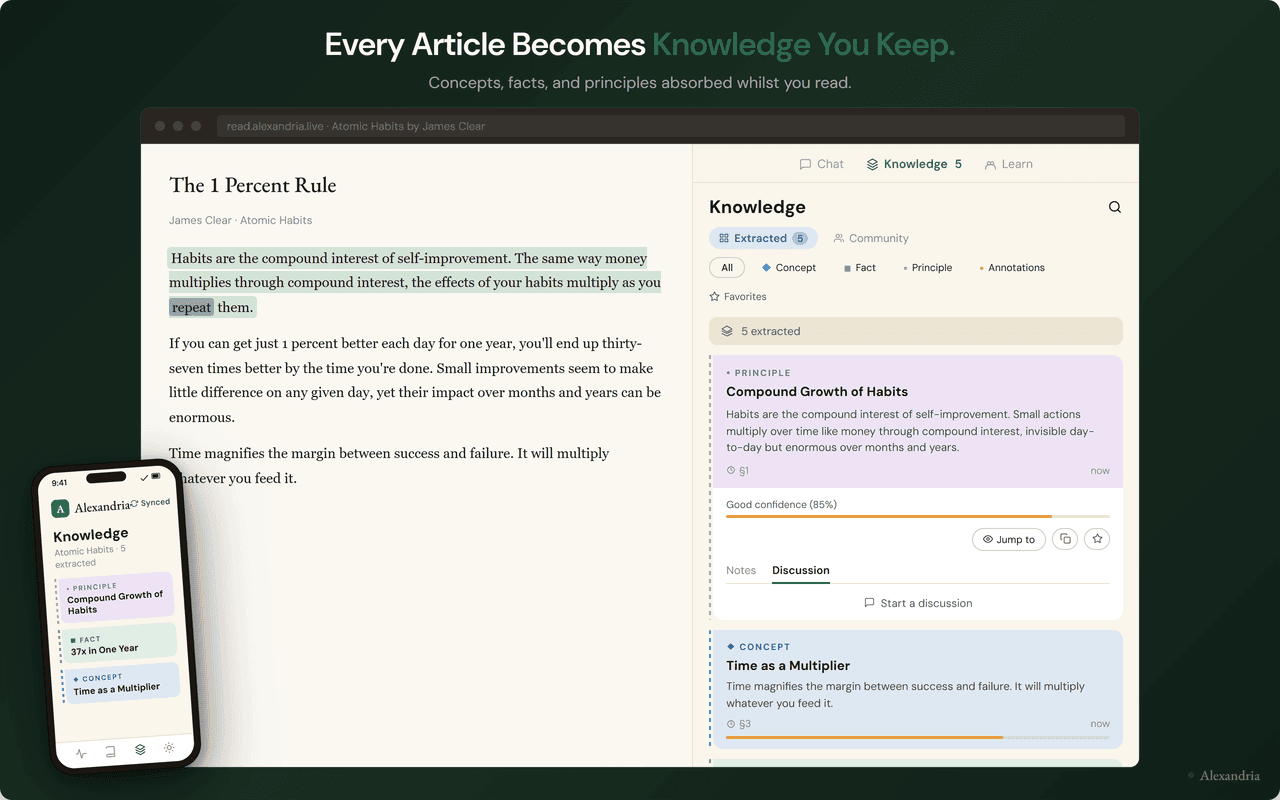
What an article looks like when you open it in your library
- Clean reading viewArticles render without ads, popups, or layout clutter. Just the content.
- Concepts extractedKey ideas surface alongside the article so you can see what matters before you finish reading.
- Highlights you saveSave the lines that matter and they flow into spaced-repetition reviews so you actually remember them.